Cam Stream Time Tracking (2026): Which Sites Show Your Hours, and How to Track Them All
If you have ever tried to answer a simple question, how many hours was I actually live last week, you have probably found there is no simple answer. Most cam sites do not show you your stream time at all. A few show a version of it, and no two of them define it the same way. And the moment you broadcast on more than one site, or run a studio with models spread across several, the number stops meaning much at all.
This guide lays out exactly what each of the nine major cam sites shows you and hides, why those hours matter more than most broadcasters realise, why third-party hour trackers rarely agree with each other, and how to get one accurate stream-time figure across every site you use.
The short answer: only three of nine sites show your real stream time
Of the nine major cam sites, only three give a broadcaster a genuine time figure inside their own dashboard, and even those three mean different things by it.
- Streamate shows a live session timer with your total time online, your current session time, and your total paid time.
- LiveJasmin shows your total working time and your average earnings per hour, broken down by show type. Note that this is billable working time, not raw minutes online.
- BongaCams shows a Time spent online figure in its Statistics section, next to your earnings and top members.
Chaturbate gives you only an indirect picture, and the remaining five sites give you no usable stream-time total at all. Here is the full breakdown.
Native stream-time exposure across the 9 cam sites
| Cam site | Shows your stream time? | What you actually get |
|---|---|---|
| Streamate | Yes | A live session timer: total time online, current session, and total paid time. |
| LiveJasmin | Yes | Total working time and earnings per hour, split by Privates, Member chat, Free chat and VIP Show. |
| BongaCams | Yes | A Time spent online stat in Statistics, alongside earnings and top members. |
| Chaturbate | Indirect only | A schedule heatmap of when you tend to be online, and a Token Stats CSV you can derive hours from. No plain hours total. |
| MyFreeCams | No | A CamScore ranking (tokens versus time broadcast) and a new-model tag for your first 10 hours, but no broadcast-hours view. |
| Stripchat | No | No native online-hours total in the model panel. The Strip Hours and SC Cam Insights tools exist precisely to fill this gap. |
| CamSoda | No | Ratings only. No session or hours view surfaced to the model. |
| Cam4 | Not surfaced | An Insights tab with performance stats, but no confirmed online-time total. |
| Flirt4Free | Not surfaced | A broadcaster backend with statistics, but no documented hours view. |
A note on the smaller panels: Cam4, CamSoda and Flirt4Free publish very little about what their dashboards show, so if you broadcast there, confirm in your own account. What is consistent across all nine is that none of them gives you a trustworthy, at-a-glance hours total the way Streamate does, and not one of them can show you your time across other sites.
Why your stream time matters more than you think
It is easy to treat hours as a vanity number. On a cam site, they are closer to a ranking input.
Most sites reward time on camera, even when they do not say so directly. MyFreeCams gives new models a visibility boost for their first 10 hours of broadcasting, and its CamScore blends tokens earned against time broadcast. Stripchat gives new models a promotional window that runs for 15 days from their first stream. BongaCams runs hourly Top Chat Rooms rankings and weekly Top Models contests, where consistent hours are what keep you visible. LiveJasmin recommends at least 10 hours a week and shows you earnings per hour so you can see the trade directly.
None of these is a hard contractual minimum, and you should be wary of any blog that tells you a site will ban you below some number of hours. But the incentive is real: on every major site, hours are competitively necessary, and you cannot manage what you cannot measure.
For a studio, the stakes are higher and more concrete. If you pay models by the hour, a fuzzy or missing hours figure turns into pay disputes. If you schedule shifts, the only way to catch a no-show or a short shift is to compare the scheduled hours against the actual ones. And if a model streams to more than one site, the naive total lies to you, which brings us to the real problem.
Why third-party hour trackers disagree with each other
Because the sites hide this data, an ecosystem of third-party trackers has grown up to estimate it. They are useful, but they share three limits that explain why two of them will rarely give you the same number.
Almost all of them cover a single site. Strip Hours tracks Stripchat, CBhours tracks Chaturbate, Sodahours tracks CamSoda. Run on three sites and you are checking three separate tools with three separate definitions of online.
Most of them estimate rather than measure. They poll a model's public online status at intervals, often every 5 to 20 minutes, or read an exported earnings CSV after the fact. Interval polling means a short session can be missed entirely, and the total is always an approximation.
And none of them deduplicates. If a model is live on two sites at once, every one of these tools counts both, so the hours add up to more than the model ever actually streamed.
| Tracker type | How it gets hours | The limit |
|---|---|---|
| Single-site pollers (Strip Hours, CBhours, Sodahours) | Poll public online status at intervals | One site only; coarse; misses short sessions |
| CSV and earnings tools (CamCash, CamDash) | Read your exported tip data | Manual, per site, earnings-focused, not live |
The result is that everyone quoting stream-time numbers is quoting an estimate, and the estimates disagree.
The multi-site trap: a naive total is not your real stream time
This is the part no other tool handles, and it is the one that matters most for anyone on more than one site.
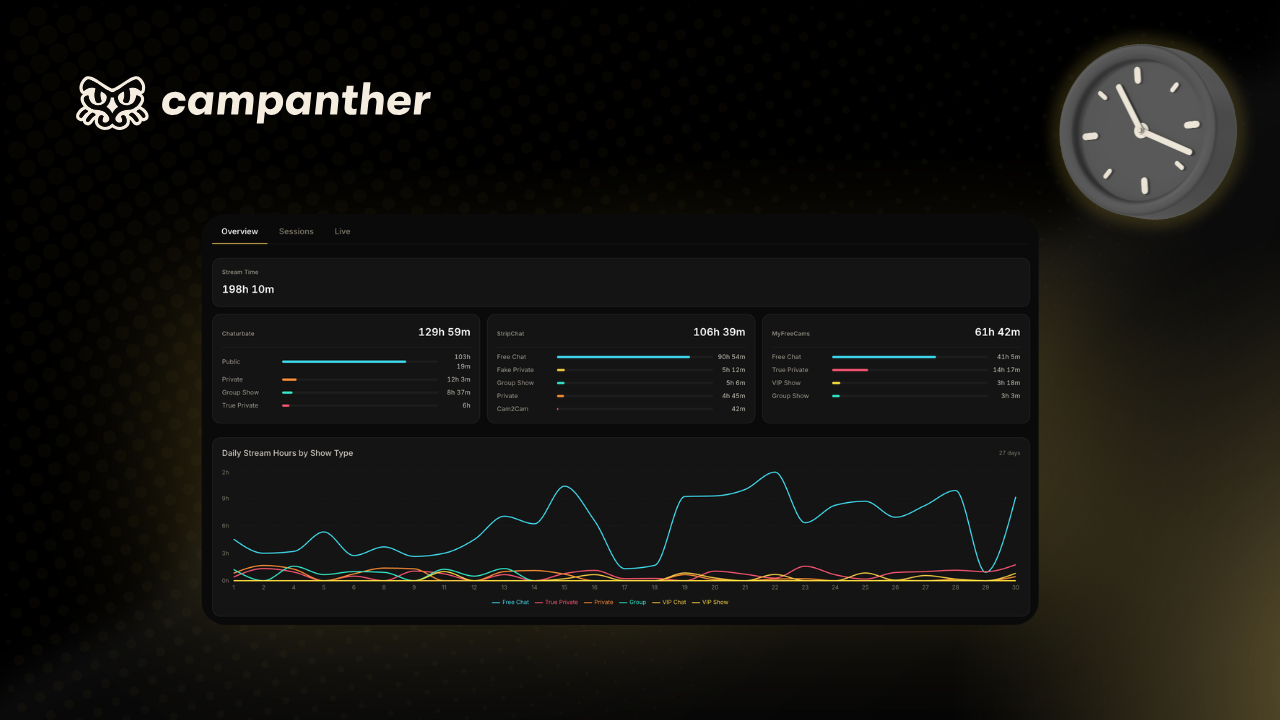
Say a model streams to Chaturbate, Stripchat and MyFreeCams in a month, and each site or single-site tracker reports her hours: 130 on Chaturbate, 107 on Stripchat, 62 on MyFreeCams. Add them up and you get roughly 298 hours. But she did not stream 298 hours. Much of that time she was live on two sites at once, so the same minute was counted twice. Her real, unique online time might be closer to 198 hours.
That gap, a hundred hours in this example, is not a rounding error. If you pay by the hour, it is the difference between a fair payslip and an argument. If you are a model judging your own effort, it is the difference between the truth and a flattering fiction. Adding up per-site figures always overstates a multi-site broadcaster, and no native dashboard and no third-party tracker removes the overlap, and nearly every tracker only watches a single site to begin with. The only honest figure is deduplicated unique online time: every minute you were live somewhere, counted once.
What accurate stream-time tracking actually looks like
This is the gap CamPanther is built to close. Instead of polling public status every few minutes or reading a CSV after the fact, it watches the rooms live across all nine major cam sites, so tracking is sub-second accurate rather than rounded to the nearest poll.
That gives you a few things no single-site tool can:
- Every site in one place. Chaturbate, Stripchat, MyFreeCams, BongaCams, CamSoda, LiveJasmin, Cam4, Flirt4Free and Streamate, tracked together.
- Every show type detected. Public, private, group and spy time counted separately, so you see not just that you were online, but what you were doing.
- A full session timeline. Which show type you were in, when, and for how long, across a session.
- Deduplicated online time. Live on two sites at once collapses into one true total, so the hundred-hour overstatement above never happens.
- No logins or extensions. Tracking works from a model's public username, so a studio does not need account passwords or a browser plugin on anyone's machine.
For a solo creator, that is data you have never been able to see on most sites: your real hours, your best show types, your actual session history. For a studio, it is every model's true stream time, tied to their scheduled shifts, so hours-based pay is accurate and no-shows are obvious. You can see how CamPanther works for studios, or check the pricing.
If you also want to understand how single-site analytics tools fit alongside this, our breakdown of CB Cam Insights for studios covers where per-site analytics end and cross-site operations begin.
Frequently asked questions
Can you see your stream time on Chaturbate? Not as a total. Chaturbate gives you a schedule heatmap of when you tend to be online and a Token Stats CSV you would have to derive hours from, but no plain broadcast-hours figure. To see a clean stream-time total on Chaturbate you need a third-party tracker.
Which cam sites show broadcasters their stream time? Only three of the nine major sites show a real time figure natively: Streamate, with a live session timer; LiveJasmin, with total working time and earnings per hour; and BongaCams, with a Time spent online stat. Chaturbate shows only an indirect heatmap, and MyFreeCams, Stripchat, CamSoda, Cam4 and Flirt4Free show no usable hours total.
Does BongaCams show your time online? Yes. BongaCams has a Time spent online figure in the Statistics section of the model account, alongside earnings and top members. It is one of the few cam sites that surfaces stream time to the broadcaster directly.
How can a studio track how long its models stream across multiple sites? Native site tools only cover their own site, and third-party trackers each cover a single site. To track a whole roster you need a layer that monitors every site and deduplicates overlapping online time, so a model live on two sites at once counts as one hour, not two.
Why do cam hour trackers show different numbers? Most estimate hours by polling a model's public online status every 5 to 20 minutes, or by reading an earnings CSV. Different intervals and data sources produce different totals, and none removes the overlap between sites. Accurate stream time needs continuous, sub-second monitoring, not periodic polling.
How do I track how many hours I streamed? On the few sites that show it, check the statistics or session panel in your model account. On every other site there is no native total, so you need a tracker, and to get one honest number across multiple sites, use a tool that watches every site live and deduplicates overlapping time.
Run your cam business on CamPanther.
Automatic stream-time tracking, earnings and payouts, and cross-platform member intelligence, all in one dashboard.
Start 7-day free trial